<?xml version="1.0" encoding="utf-8"?><feed xmlns="http://www.w3.org/2005/Atom" ><generator uri="https://jekyllrb.com/" version="3.10.0">Jekyll</generator><link href="https://lexsysko.github.io/feed.xml" rel="self" type="application/atom+xml" /><link href="https://lexsysko.github.io/" rel="alternate" type="text/html" /><updated>2026-06-01T02:31:08+00:00</updated><id>https://lexsysko.github.io/feed.xml</id><title type="html">Lex SysKo</title><subtitle>lexsysko.github.io</subtitle><entry><title type="html">Comparing Performance After Optimization in django-mariadb-vector</title><link href="https://lexsysko.github.io/2026/03/29/comparing-performance-after-optimization-in-django-mariadb-vector.html" rel="alternate" type="text/html" title="Comparing Performance After Optimization in django-mariadb-vector" /><published>2026-03-29T18:28:00+00:00</published><updated>2026-03-29T18:28:00+00:00</updated><id>https://lexsysko.github.io/2026/03/29/comparing-performance-after-optimization-in-django-mariadb-vector</id><content type="html" xml:base="https://lexsysko.github.io/2026/03/29/comparing-performance-after-optimization-in-django-mariadb-vector.html"><![CDATA[<p>Since version v0.2.0, the ‘<a href="https://github.com/lexxai/django-mariadb-vector">django-mariadb-vector</a>‘ library includes several optimization options. Here are the results from performance tests.</p>

<p><a href="https://blogger.googleusercontent.com/img/b/R29vZ2xl/AVvXsEj-rmEfoDsCN-hz_Dnqy3oOhZf-ZWtnr4LLMXwi4tiW4e2qIJsu9cKMDrR99GPgoPQ4xmgTyFLHzJZftZW0EEgJRYttBhCnZhC7S0dVecu7M1qWaXSRrPNEfLl5YOw7qCrkpbF-TiEX34oGMBYERQeUJk-vFy1TE_1g3woGrfO9vr4QiNN2tirD_4wTQBE1/s1690/.perf_v0.2.0.png"><img src="/assets/images/blog/ba2a47ea6962ae43-65e1f6352affc05e.png" alt="" /></a><br />
<em>Performance results</em></p>

<p><em><strong>Note</strong>: Performance was measured using 20,000 iterations (3 runs) in <code class="language-plaintext highlighter-rouge">tests/measure\_performance.py</code>, with randomly generated vectors of dimension 3072.</em></p>

<h3 id="benefits-orlson-vs-json">Benefits ‘orlson’ vs ‘json’</h3>

<ul>
  <li>Up to <strong>~20×</strong> <strong>faster</strong> compared to the standard <code class="language-plaintext highlighter-rouge">json</code> library on generate vector data</li>
  <li>Up to <strong>~8×</strong> <strong>faster</strong> compared to the standard <code class="language-plaintext highlighter-rouge">json</code> library on response vector data</li>
</ul>

<h3 id="benefits-of-binary-on-response-vector-data">Benefits of ‘binary’ on response vector data</h3>

<ul>
  <li>Up to <strong>~16× faster</strong> compared to the standard <code class="language-plaintext highlighter-rouge">json</code> library</li>
  <li>About <strong>~2× faster</strong> compared to <code class="language-plaintext highlighter-rouge">orjson</code></li>
</ul>

<h3 id="testing-output">Testing output</h3>

<div class="language-plaintext highlighter-rouge"><div class="highlight"><pre class="highlight"><code>Warming for 3 seconds

decode_binary start testing...
binary: 1.8913245666384075 [1.9641265999525785, 1.8629208999918774, 1.846926199970767]

decode_orjson_str start testing...
json_str: 3.804304266697727 [4.095871299970895, 3.7040354000637308, 3.6130061000585556]

decode_json_str start testing...
json_str: 30.897333099972457 [30.78853879997041, 31.119306599954143, 30.784153899992816]
* decode binary is fastest than json in 16.34 times
* decode binary is fastest than orjson in 2.01 times
* decode orjson is fastest than json in 8.12 times

encode_orjson_str start testing...
orjson_str: 2.32788303331472 [2.455615399987437, 2.2925777999917045, 2.235455899965018]

encode_json_str start testing...
json_str: 51.04346506666237 [50.961705199908465, 50.88195970002562, 51.28673030005302]
* encode orjson is fastest than json in 21.93 times
</code></pre></div></div>

<h3 id="reference">Reference</h3>

<p>🔗 <a href="/2026-03-28-demo-django-application-of-usage-library-django-mariadb-vector-mariadb-vector.md">DEMO Django application of usage library ‘django-mariadb-vector’ (MariaDB Vector)</a></p>

<p>🔗 <a href="/2026-03-28-django-mariadb-vector-package-on-pypi---django-mariadb-vector.md">Django MariaDB Vector package on pypi - ‘django-mariadb-vector’</a></p>

<p>🔗 Repo library: <a href="https://github.com/lexxai/django-mariadb-vector">https://github.com/lexxai/django-mariadb-vector</a></p>

<p>🔗 Repo Demo: <a href="https://github.com/lexxai/django-mariadb-vector-demo">https://github.com/lexxai/django-mariadb-vector-demo</a></p>]]></content><author><name></name></author><category term="Django" /><category term="django-mariadb-vector" /><category term="JSON" /><category term="mariadb" /><category term="mysql" /><category term="orjson" /><category term="performance" /><category term="SQL" /><summary type="html"><![CDATA[Since version v0.2.0, the ‘django-mariadb-vector‘ library includes several optimization options. Here are the results from performance tests.]]></summary></entry><entry><title type="html">DEMO Django application of usage library ‘django-mariadb-vector’ (MariaDB Vector)</title><link href="https://lexsysko.github.io/2026/03/28/demo-django-application-of-usage-library-django-mariadb-vector-mariadb-vector.html" rel="alternate" type="text/html" title="DEMO Django application of usage library ‘django-mariadb-vector’ (MariaDB Vector)" /><published>2026-03-28T18:00:00+00:00</published><updated>2026-03-28T18:00:00+00:00</updated><id>https://lexsysko.github.io/2026/03/28/demo-django-application-of-usage-library-django-mariadb-vector-mariadb-vector</id><content type="html" xml:base="https://lexsysko.github.io/2026/03/28/demo-django-application-of-usage-library-django-mariadb-vector-mariadb-vector.html"><![CDATA[<p><a href="https://blogger.googleusercontent.com/img/b/R29vZ2xl/AVvXsEhWpdawnrLBWLhdvSLOBiAaLDTc0HrMioHcvvisuQ3w949jqqu12_efE-MpV1p5Nw2ndIS8vnF75rMj3MeRrASxjDVojhS8gf213_2uBtHhONEzxvknIN08yyXQofOj_7uT0IttLd3OTkj4q00NyOklsCr42X8y3tyyJQdX9tSzxqtYkh3uzHkLczvZ-TNr/s1316/django-mairadb-vector.png"><img src="/assets/images/blog/f56c645707d8edb6-49d29085051d37f5.png" alt="" /></a><br />
<em>pip install django-mariadb-vector</em></p>

<p>📒 Django MariaDB Vector DEMO application </p>

<p>A minimal demo project showing how to build article recommendations using
vector similarity in Django with MariaDB as the database.</p>

<p>The app stores articles, embeds their content into vectors, and then finds
similar articles based on vector distance.</p>

<p>🔗 Repo: <a href="https://github.com/lexxai/django-mariadb-vector-demo">https://github.com/lexxai/django-mariadb-vector-demo</a><br />
🔗 Examples: <a href="https://github.com/lexxai/django-mariadb-vector-demo/tree/main/docs">https://github.com/lexxai/django-mariadb-vector-demo/tree/main/docs</a></p>

<p>🔗 Repo library: <a href="https://github.com/lexxai/django-mariadb-vector">https://github.com/lexxai/django-mariadb-vector</a></p>

<h3 id="features">Features</h3>

<ul>
  <li>Django application using MariaDB as the primary database</li>
  <li>Article model with text content</li>
  <li>Vector-based similarity search for recommendations</li>
  <li>Simple UI:</li>
  <li>
    <p>List of all articles</p>
  </li>
  <li>“Similar articles” view for a selected article</li>
  <li>Admin interface to add and manage articles</li>
</ul>

<h3 id="features-demonstrated">Features Demonstrated:</h3>

<ul>
  <li>MariaDBVectorField: Storing vector embeddings as a specialized field
in Django models.</li>
  <li>MariaDBVectorIndex: Creating HNSW (Hierarchical Navigable Small World)
indexes for efficient similarity search.</li>
  <li>RecommendationManager: Using a custom manager to perform similar_to()
queries based on vector similarity.</li>
</ul>

<h3 id="examples">Examples</h3>

<p><a href="https://blogger.googleusercontent.com/img/b/R29vZ2xl/AVvXsEh6H2DxIFg2u5vuWgAY-dNk6NsTWgbTyUo7JciV4NJp7rSpG1sE_h2oK5clBgTLgMxErBrE2dwcCzAzVNf29zxI7ht6zEfpS38_NS2fPVhQdwjjadOUYQYPwLMqUtcAEf4oFM-bfow4KM_DB-8coNFVHUk24iHQnxMUPlB8uJw1IPZDQgVuSXUtY4tELRMH/s1391/arts.png"><img src="/assets/images/blog/25b29e0b4e0ce045-bb675b88b82bbcce.png" alt="" /></a><br />
<em>List of all articles</em></p>

<p><a href="https://blogger.googleusercontent.com/img/b/R29vZ2xl/AVvXsEh6eIEhQU-P5yneae_M0iLsOS9jEpU2PG19YLH_y8C4TkDZETf7hTgSK_L9YSpsi4nbWt21obz_QkIxrHKpYn32VPOXc0b7YxtS-Hyf5jKNWSdiEcxKa__GuoM2bD-aeKrL8xiRg4soh5CsAGAPdt6QH4fs6r8VYP8EYL-uC2x0oiPqCtSze5XDmX6KKCVu/s1430/art1.png"><img src="/assets/images/blog/e4cfd272b9ebd7a8-0c81c95b508da644.png" alt="" /></a><br />
<em>List of articles similar to Article with pk=1</em></p>

<p><a href="https://blogger.googleusercontent.com/img/b/R29vZ2xl/AVvXsEiBod4VbvvLAAbe8jid7mFtHAlqaXVswVRRSV7-GqIZUMVkcsGtzozMtZAdzQ0RtYOCE1Hnh6pnpvDKY1q-KXebyr50-Jn0Jf-Tm9erc3UD7B8ruc_ndTwBr9KAlqp4ELuLbCsP_FD0CqtxYVjwPFQhUJeI8i3Cpz27PBxrs4gVzAVtjJhbFuEHcfBVWCMi/s1899/admin-art2.png"><img src="/assets/images/blog/8e4c7d4e0af9b20b-2a241e4e0cab5ce6.png" alt="" /></a><br />
<em>Adding new article data through the Django admin</em></p>

<h3 id="simple-example-of-usage">Simple example of usage:</h3>

<div class="language-plaintext highlighter-rouge"><div class="highlight"><pre class="highlight"><code>!pip install django-mariadb-vector

from django.db import models
from django_mariadb_vector import MariaDBVectorField, MariaDBVectorIndex, VecDistance


class MyModel(models.Model):
    embedding = MariaDBVectorField(dimensions=3)

    class Meta:
        indexes = [
            # Vector index (MariaDB 11.8.2+)
            MariaDBVectorIndex(fields=["embedding"], dimensions=3)
        ]

# Find 5 most similar records to a reference vector
reference_vector = [0.1, 0.2, 0.3]
results = MyModel.objects.annotate(
    distance=VecDistance("embedding", reference_vector)
).order_by("distance")[:5]
</code></pre></div></div>

<h3 id="using-a-recommendation-manager-can-simplify-vector-searches-in-your-application">Using a Recommendation Manager can simplify vector searches in your application:</h3>

<p><em>models.py:</em></p>

<div class="language-plaintext highlighter-rouge"><div class="highlight"><pre class="highlight"><code>from django.db import models

from django_mariadb_vector import MariaDBVectorField, MariaDBVectorIndex
from django_mariadb_vector.managers import RecommendationManager


class MyModel(models.Model):
    embedding = MariaDBVectorField(dimensions=3)
    
    objects = RecommendationManager(vector_field="embedding")
    
    class Meta:
        indexes = [
            # Vector index (MariaDB 11.8.2+)
            MariaDBVectorIndex(fields=["embedding"], dimensions=3, m=16),
        ]
</code></pre></div></div>

<h3 id="reference-vector">reference vector:</h3>

<div class="language-plaintext highlighter-rouge"><div class="highlight"><pre class="highlight"><code>from .models import MyModel

reference_vector:list[float] = [0.1, 0.2, 0.3]

# Find 5 most similar records to a reference vector
results = MyModel.objects.similar_to_vector(reference_vector, limit=5)

for item in results:
    print(f"{item.name} - Distance: {item.distance}")
</code></pre></div></div>

<h3 id="reference-id">reference id:</h3>

<div class="language-plaintext highlighter-rouge"><div class="highlight"><pre class="highlight"><code>from .models import MyModel

reference_id:int = 1
# Find 5 most similar records to a reference object by id
results = MyModel.objects.similar_to(reference_id, limit=5)

for item in results:
    print(f"{item.name} - Distance: {item.distance}")
</code></pre></div></div>

<p>#Django #MairaDB #VectorDatabase #DjangoORM</p>]]></content><author><name></name></author><category term="Django" /><category term="mariadb" /><category term="mysql" /><category term="SQL" /><category term="vector" /><category term="vector-database" /><summary type="html"><![CDATA[pip install django-mariadb-vector]]></summary></entry><entry><title type="html">Django MariaDB Vector package on pypi - ‘django-mariadb-vector’</title><link href="https://lexsysko.github.io/2026/03/28/django-mariadb-vector-package-on-pypi-django-mariadb-vector.html" rel="alternate" type="text/html" title="Django MariaDB Vector package on pypi - ‘django-mariadb-vector’" /><published>2026-03-28T15:21:00+00:00</published><updated>2026-03-28T15:21:00+00:00</updated><id>https://lexsysko.github.io/2026/03/28/django-mariadb-vector-package-on-pypi---django-mariadb-vector</id><content type="html" xml:base="https://lexsysko.github.io/2026/03/28/django-mariadb-vector-package-on-pypi-django-mariadb-vector.html"><![CDATA[<p><a href="https://blogger.googleusercontent.com/img/b/R29vZ2xl/AVvXsEhWpdawnrLBWLhdvSLOBiAaLDTc0HrMioHcvvisuQ3w949jqqu12_efE-MpV1p5Nw2ndIS8vnF75rMj3MeRrASxjDVojhS8gf213_2uBtHhONEzxvknIN08yyXQofOj_7uT0IttLd3OTkj4q00NyOklsCr42X8y3tyyJQdX9tSzxqtYkh3uzHkLczvZ-TNr/s1316/django-mairadb-vector.png"><img src="/assets/images/blog/f56c645707d8edb6-49d29085051d37f5.png" alt="" /></a><br />
<em>pip install django-mariadb-vector</em></p>

<p>📒 Django MariaDB Vector</p>

<p>The Vector field, introduced in
<a href="https://www.linkedin.com/company/mariadb/">MariaDB</a> 11.7, now has a
simple library called ‘django-mariadb-vector’ that adds Django ORM support for
it.</p>

<p>Created by me and shared for everyone to use.</p>

<p>🔸
<a href="https://pypi.org/project/django-mariadb-vector/">pip install django-mariadb-vector</a></p>

<p>🔗 Repo:
<a href="https://github.com/lexxai/django-mariadb-vector">https://github.com/lexxai/django-mariadb-vector</a><br />
🔗 Demo:
<a href="https://github.com/lexxai/django-mariadb-vector-demo">https://github.com/lexxai/django-mariadb-vector-demo</a><br />
🔗 Examples:
<a href="https://github.com/lexxai/django-mariadb-vector-demo/tree/main/docs">https://github.com/lexxai/django-mariadb-vector-demo/tree/main/docs</a></p>

<p>MariaDB introduced native vector support, allowing you to store
embeddings and perform similarity search directly in the database.</p>

<p>However,
Django currently lacks:</p>

<ul>
  <li>a native VECTOR model field</li>
  <li>ORM support for vector queries</li>
  <li>automatic migration</li>
  <li>support for vector indexes</li>
</ul>

<p>This project fills that gap by providing a clean, Django-native
way to work with MariaDB vectors.</p>

<p>Simple example of usage:</p>

<div class="language-plaintext highlighter-rouge"><div class="highlight"><pre class="highlight"><code>!pip install django-mariadb-vector

from django.db import models
from django_mariadb_vector import MariaDBVectorField, MariaDBVectorIndex, VecDistance


class MyModel(models.Model):
    embedding = MariaDBVectorField(dimensions=3)

    class Meta:
        indexes = [
            # Vector index (MariaDB 11.8.2+)
            MariaDBVectorIndex(fields=["embedding"], dimensions=3)
        ]

# Find 5 most similar records to a reference vector
reference_vector = [0.1, 0.2, 0.3]
results = MyModel.objects.annotate(
    distance=VecDistance("embedding", reference_vector)
).order_by("distance")[:5]
</code></pre></div></div>

<p>#Django
#MairaDB
#VectorDatabase
#DjangoORM</p>]]></content><author><name></name></author><category term="Django" /><category term="mariadb" /><category term="vector" /><category term="vector-database" /><summary type="html"><![CDATA[pip install django-mariadb-vector]]></summary></entry><entry><title type="html">Blogger to GitHub Pages Sync Tool (blog2ghp)</title><link href="https://lexsysko.github.io/2026/03/04/blogger-to-github-pages-sync-tool-blog2ghp.html" rel="alternate" type="text/html" title="Blogger to GitHub Pages Sync Tool (blog2ghp)" /><published>2026-03-04T18:10:00+00:00</published><updated>2026-03-04T18:10:00+00:00</updated><id>https://lexsysko.github.io/2026/03/04/blogger-to-github-pages-sync-tool-blog2ghp</id><content type="html" xml:base="https://lexsysko.github.io/2026/03/04/blogger-to-github-pages-sync-tool-blog2ghp.html"><![CDATA[<h4 id="навіщо">Навіщо?</h4>

<p>Я вирішив отримати практичний досвід роботи з GitHub Actions та GitHub
Pages.</p>

<p>Мій блог має RSS-стрічку, і це дало ідею: якщо автоматично обробляти
RSS-сторінки, можна отримати повну резервну копію блогу у форматі Markdown.</p>

<p>А вже цей Markdown легко опублікувати в репозиторії GitHub Pages / Jekyll.</p>

<p>Таким чином я отримую:</p>

<ul>
  <li>автоматичний бек-ап контенту</li>
  <li>контроль над контентом у Git</li>
  <li>можливість міграції з Blogger без втрат</li>
  <li>статичну версію блогу</li>
</ul>

<h4 id="приклад-використання">Приклад використання</h4>

<p><a href="https://blogger.googleusercontent.com/img/b/R29vZ2xl/AVvXsEh8pjaHJcy1wgT3n3h2tbL8SqTUvYj_4y6AfXz9xPklVAc6Bf4mpok61p0A25UIoNbBYiEopFoz5tBBnk560eUNDfB5O2r7pFjGxmmBMFJvG8ahj20GCFALusLZFrH75N3MaTmSD4TG01KD75ByddXJVIz7ZeVC7puQwBEH9GcpnF-qlrWjcVnLddz12bkv/s1912/%D0%97%D0%BD%D1%96%D0%BC%D0%BE%D0%BA%20%D0%B5%D0%BA%D1%80%D0%B0%D0%BD%D0%B0%202026-03-04%20045700.png"><img src="/assets/images/blog/e9358132cda8c4c2-e98f9acf8d93afc3.png" alt="" /></a><br />
<em>Блоґ котрий копіюється</em></p>

<p><a href="https://blogger.googleusercontent.com/img/b/R29vZ2xl/AVvXsEi9t2wb-DqamZzghZMXiw75UG3obQtS9aWHO1rJ-Vp1-QTBGALRYbHNztLJk6zMGPaXvKoVocc5Cw1vPpxZR6e0RzxZePbj3eTCSARMol6mUvsG8kXDQ9bt1gejqzlscJSjf-lyQZocc0Io3KYZPOy8rroV2tVCC1ocN4dfupCRKi2Yuy-z2d3l9YQAa-Rw/s1370/%D0%97%D0%BD%D1%96%D0%BC%D0%BE%D0%BA%20%D0%B5%D0%BA%D1%80%D0%B0%D0%BD%D0%B0%202026-03-04%20045610.png"><img src="/assets/images/blog/fdeb3cf495488d9e-69de39fe4772b621.png" alt="" /></a><br />
<em>Результат копіювання на GitHub pages</em></p>

<h4 id="опис-продукту">Опис продукту</h4>

<p>Це
<a href="https://github.com/lexxai/BLOG2GHP">Python-утиліта,</a>
яка синхронізує пости з RSS-стрічки Blogger у репозиторій GitHub Pages /
Jekyll.</p>

<p>Вона автоматично:</p>

<ul>
  <li>завантажує зображення,</li>
  <li>переписує внутрішні посилання,</li>
  <li>генерує коректно оформлені Markdown-файли з YAML frontmatter.</li>
</ul>

<h3 id="можливості">Можливості</h3>

<ul>
  <li><strong>Automated Sync</strong><br />
Отримує пости з RSS-стрічки Blogger та
синхронізує їх із репозиторієм.</li>
  <li><strong>Image Handling</strong><br />
Завантажує зображення блогу та зберігає їх
локально в:<br />
assets/images/blog/</li>
  <li><strong>Link Rewriting</strong><br />
Оновлює старі доменні посилання, замінюючи їх
на нову адресу GitHub Pages.</li>
  <li><strong>Jekyll-compatible Outpu</strong>t<br />
Генерує Markdown-файли з правильно
оформленим YAML frontmatter, сумісним із Jekyll.</li>
  <li><strong>Dry Run Mode</strong><br />
Дозволяє попередньо переглянути зміни без
фактичного створення або перезапису файлів.</li>
  <li><strong>Configurable</strong><br />
Гнучка конфігурація через змінні середовища.</li>
</ul>

<h4 id="як-це-працює">Як це працює</h4>

<p>Утиліта працює як простий пайплайн обробки даних:</p>

<h3 id="отримання-rss">Отримання RSS</h3>

<p>Скрипт підключається до RSS-стрічки Blogger та отримує список постів.</p>

<p>З RSS витягується:</p>

<ul>
  <li>заголовок</li>
  <li>дата публікації</li>
  <li>HTML-контент</li>
  <li>категорії (labels)</li>
  <li>постійне посилання (permalink)</li>
</ul>

<h3 id="обробка-html-контенту">Обробка HTML-контенту</h3>

<p>Отриманий HTML проходить декілька етапів трансформації:</p>

<ul>
  <li>очищення зайвих тегів</li>
  <li>конвертація HTML → Markdown</li>
  <li>переписування внутрішніх посилань на новий GitHub Pages домен</li>
  <li>пошук усіх зображень</li>
</ul>

<h3 id="завантаження-зображень">Завантаження зображень</h3>

<p>Усі знайдені зображення:</p>

<ul>
  <li>завантажуються локально</li>
  <li>зберігаються у assets/images/blog/</li>
  <li>перейменовуються за безпечним шаблоном</li>
  <li>їхні шляхи автоматично оновлюються в Markdown-файлі</li>
  <li>Таким чином блог стає повністю автономним і не залежить від
зовнішнього CDN Blogger.</li>
</ul>

<h3 id="генерація-markdown-файлу">Генерація Markdown-файлу</h3>

<p>Для кожного поста створюється файл у форматі: YYYY-MM-DD-post-slug.md</p>

<p>Файл містить:</p>

<ul>
  <li>YAML frontmatter (title, date, tags, layout)</li>
  <li>основний Markdown-контент</li>
  <li>оновлені локальні шляхи до зображень</li>
  <li>Формат повністю сумісний з Jekyll.</li>
</ul>

<h3 id="dry-run-режим">Dry Run режим</h3>

<p>У режимі dry-run:</p>

<ul>
  <li>файли не записуються</li>
  <li>зображення не зберігаються</li>
  <li>показується список змін, які будуть виконані</li>
</ul>

<p>Це дозволяє безпечно перевірити результат перед реальною синхронізацією.</p>

<h3 id="інтеграція-з-github-actions">Інтеграція з GitHub Actions</h3>

<p>Скрипт можна запускати:</p>

<ul>
  <li>локально</li>
  <li>через cron</li>
  <li>автоматично через GitHub Actions</li>
</ul>

<p>У випадку GitHub Actions:</p>

<ul>
  <li>Виконується запуск утиліти</li>
  <li>Генеруються / оновлюються Markdown-файли</li>
  <li>Зміни комітяться у репозиторій</li>
  <li>GitHub Pages автоматично перебудовує сайт</li>
</ul>

<p>У результаті отримуємо повністю автоматизований процес резервного
копіювання та публікації.</p>

<p><a href="https://blogger.googleusercontent.com/img/b/R29vZ2xl/AVvXsEgMbdjFyri5Wvn8WIpyuiJoLhyphenhyphenUVxBxtl_r6e-m_D7UFgjeRHfvMSuVd80Ii-82T5XeDKIIr9NXQf9l1yitvAhAGtrxLnxRAeQ9oMTvLxXEZ7Qi29paUyiGNpcJdnO_wmeAkfSjAo6GtuHQ260DbJWLV76Li_ao8xfIB32oqsQ8goZi97C1CQZhD6uvS1Fc/s1883/%D0%97%D0%BD%D1%96%D0%BC%D0%BE%D0%BA%20%D0%B5%D0%BA%D1%80%D0%B0%D0%BD%D0%B0%202026-03-04%20202020.png"><img src="/assets/images/blog/70eebaceef240f01-30a8870e9f3badaf.png" alt="" /></a><br />
<em>GitHub Actions</em></p>

<h3 id="підсумок-процесу">Підсумок процесу</h3>

<p>RSS → HTML → Markdown → Download Images → Rewrite Links → Commit → GitHub
Pages Build</p>

<h4 id="посилання">Посилання</h4>

<ul>
  <li><a href="https://github.com/lexxai/BLOG2GHP">GitHub repository - BLOG2GHP</a></li>
  <li><a href="https://lexxai.blogspot.com/">Маємо те, що маємо. Усе що відбувається - на краще</a></li>
  <li><a href="https://lexxai.github.io/">https://lexxai.github.io/</a></li>
</ul>]]></content><author><name></name></author><category term="GitHub" /><category term="GitHub Actons" /><category term="multithread" /><category term="python" /><category term="sync" /><summary type="html"><![CDATA[Навіщо?]]></summary></entry><entry><title type="html">Ollama DeProxy або як отримати локальний доступ до віддаленої Ollama</title><link href="https://lexsysko.github.io/2026/02/25/ollama-deproxy-%D0%B0%D0%B1%D0%BE-%D1%8F%D0%BA-%D0%BE%D1%82%D1%80%D0%B8%D0%BC%D0%B0%D1%82%D0%B8-%D0%BB%D0%BE%D0%BA%D0%B0%D0%BB%D1%8C%D0%BD%D0%B8%D0%B9-%D0%B4%D0%BE%D1%81%D1%82%D1%83%D0%BF-%D0%B4%D0%BE-%D0%B2%D1%96%D0%B4%D0%B4%D0%B0%D0%BB%D0%B5%D0%BD%D0%BE%D1%97-ollama.html" rel="alternate" type="text/html" title="Ollama DeProxy або як отримати локальний доступ до віддаленої Ollama" /><published>2026-02-25T15:43:00+00:00</published><updated>2026-02-25T15:43:00+00:00</updated><id>https://lexsysko.github.io/2026/02/25/ollama-deproxy-%D0%B0%D0%B1%D0%BE-%D1%8F%D0%BA-%D0%BE%D1%82%D1%80%D0%B8%D0%BC%D0%B0%D1%82%D0%B8-%D0%BB%D0%BE%D0%BA%D0%B0%D0%BB%D1%8C%D0%BD%D0%B8%D0%B9-%D0%B4%D0%BE%D1%81%D1%82%D1%83%D0%BF-%D0%B4%D0%BE-%D0%B2%D1%96%D0%B4%D0%B4%D0%B0%D0%BB%D0%B5%D0%BD%D0%BE%D1%97-ollama</id><content type="html" xml:base="https://lexsysko.github.io/2026/02/25/ollama-deproxy-%D0%B0%D0%B1%D0%BE-%D1%8F%D0%BA-%D0%BE%D1%82%D1%80%D0%B8%D0%BC%D0%B0%D1%82%D0%B8-%D0%BB%D0%BE%D0%BA%D0%B0%D0%BB%D1%8C%D0%BD%D0%B8%D0%B9-%D0%B4%D0%BE%D1%81%D1%82%D1%83%D0%BF-%D0%B4%D0%BE-%D0%B2%D1%96%D0%B4%D0%B4%D0%B0%D0%BB%D0%B5%D0%BD%D0%BE%D1%97-ollama.html"><![CDATA[<p><a href="https://blogger.googleusercontent.com/img/b/R29vZ2xl/AVvXsEjWx_eS9agZ_zK8fMztc_ny0utU6bQbsF0Liq8wH1lGHpP5GUfeHKCk2gDkwhCWTaJgOfOXGSMr7ye-g2GZ5eMmJrkr9QILfqBNXIi-jWlRDZXJFYd3pmt_VC8puW5Df-4u72QE-fXngy3kwstWD4Rd6D2uENUxgi0iAjzJGNEfMByuAZOkc0adNFBJSBPZ/s1024/ollama-deproxy.png"><img src="/assets/images/blog/5407e647a6bbf4da-382eaa1ca0d7ddde.png" alt="" /></a><br />
<em>Ollama DeProxy</em></p>

<p>Я маю віддалений сервер із GPU, на якому запущена Ollama.</p>

<p>Водночас середовище розробки зазвичай очікує, що Ollama доступна локально -
наприклад, за адресою <em>http://localhost:11434</em> або в межах локальної мережі
(<em>http://192.168.0.111:11434</em>).</p>

<h3 id="класичні-рішення">Класичні рішення</h3>

<p>Найпростіший варіант — SSH-тунель:</p>

<div class="language-plaintext highlighter-rouge"><div class="highlight"><pre class="highlight"><code>ssh remote@server -L 11434:localhost:11434
</code></pre></div></div>

<p>Після цього локальний <em>localhost:11434</em> проксуватиметься на віддалений сервер.</p>

<p>Якщо ж розробників декілька і вони працюють з різних офісів або через інтернет
— можна використати VPN. Це теж робоче рішення, але воно потребує додаткової
інфраструктури та адміністрування.</p>

<h3 id="проблема-з-авторизацією">Проблема з авторизацією</h3>

<p>У моєму випадку Ollama використовується разом із OpenWebUI, який проксіює
доступ до Ollama через власний API з токен-авторизацією.</p>

<p>Однак більшість застосунків, що інтегруються з Ollama, очікують простий доступ
до http://localhost:11434 без жодної авторизації. Через це вони не можуть
напряму працювати через OpenWebUI.</p>

<h3 id="рішення--ollama-deproxy">Рішення — Ollama DeProxy</h3>

<p>Щоб спростити інтеграцію, я написав невеликий застосунок -
<strong><a href="https://lexxai.blogspot.com/ollama-deproxy">Ollama DeProxy</a></strong>.</p>

<p>Його ідея проста:</p>

<ul>
  <li>локально він виглядає як звичайна Ollama (localhost:11434);</li>
  <li>всередині - проксіює запити на віддалений сервер;</li>
  <li>за потреби додає авторизацію;</li>
  <li>дозволяє централізовано керувати доступом.</li>
</ul>

<p>Таким чином:</p>

<ul>
  <li>розробникам не потрібно налаштовувати SSH-тунелі;</li>
  <li>не обов’язково піднімати VPN;</li>
  <li>клієнтські застосунки продовжують працювати так, ніби Ollama запущена
локально.</li>
</ul>

<p>У результаті віддалений GPU-сервер використовується прозоро, без змін у
клієнтському коді.</p>

<h3 id="репозиторій">Репозиторій:</h3>

<p><strong>Ollama DeProxy</strong> -
<a href="https://github.com/lexxai/ollama-deproxy">https://github.com/lexxai/ollama-deproxy</a></p>

<h3 id="приклади-використання">Приклади використання:</h3>

<p><a href="https://blogger.googleusercontent.com/img/b/R29vZ2xl/AVvXsEj4oDdZJ87OI0gMvKw3onyi0yLWFr6AZc04NbX8P5dxgDS4CKhQ_cf3L3fH84oSvW2fsBml7jZK_PTCexI0pnX514ouylZcMh7H2FnqRV2t5ENp_NmqBZPMur-bR_ss1ieqJQw2TfkTMOlWn11rtZ1_A-IyWO7SdpV7-U9TUbuE4RBnfm4Gj93jGOy0jRWg/s1837/%D0%97%D0%BD%D1%96%D0%BC%D0%BE%D0%BA%20%D0%B5%D0%BA%D1%80%D0%B0%D0%BD%D0%B0%202026-02-25%20173628.png"><img src="/assets/images/blog/a84001fe810b3e04-85765c91b2a6b9c7.png" alt="" /></a><br />
<em>Docker container Ollama DeProxy</em></p>

<p><a href="https://blogger.googleusercontent.com/img/b/R29vZ2xl/AVvXsEgiZbRMugT6pORi5fe733spJ0gbvs6FdMAMPbnxMyj8INJ-Z2zEWGBC21CpsruocHBsq9P_yEHHgS042rC-ZdX8FZB39IpgQO7c3J-QTawWrWw3nFLi7ZLjz-x-f_uBzFlXDeM0Y71e2eUF6N4lylYo3IO2mkLPXkGHd8e6CCXn1js3uU12o-IHqmdT2YIg/s1919/%D0%97%D0%BD%D1%96%D0%BC%D0%BE%D0%BA%20%D0%B5%D0%BA%D1%80%D0%B0%D0%BD%D0%B0%202026-02-25%20173507.png"><img src="/assets/images/blog/43365cb74653e6c9-9052af3a16636e07.png" alt="" /></a><br />
<em>VS Code + Continue + Ollama DeProxy</em></p>

<p><a href="https://blogger.googleusercontent.com/img/b/R29vZ2xl/AVvXsEgo1GjkMyRMlsgtC3tPciXqIp6zuL9Jx0M6UoqcfOsYkb_bBhQHXrhQ35xSJ0WnVwagp6lvQnkWsEqPAlmQdMwTkN7xxWA0CJD-zcLdGqGlJCxaKADv1NlJvALhFOXovWOuoJJmck1RXpiLy-OHgc-sVSlq_nrfCDR6fV7P7yKVVA78oNHXSo8rfOj8owPZ/s1919/%D0%97%D0%BD%D1%96%D0%BC%D0%BE%D0%BA%20%D0%B5%D0%BA%D1%80%D0%B0%D0%BD%D0%B0%202026-02-27%20143139.png"><img src="/assets/images/blog/2407ff4104a8caea-d33ef03cc0af9c6d.png" alt="" /></a><br />
<em>VS Code + Copilot GitHub (Old version) + Ollama DeProxy</em></p>

<p><a href="https://blogger.googleusercontent.com/img/b/R29vZ2xl/AVvXsEhLdl8Lte8XIQTdbwtduu5FhWhFSdmzPtperOquDj3qAwtrDhjW10MKFQavHvk_hA6tfNBIXYfJPi57Hmd_8t_CaQpV-JPNF7s39J2lB5WF9NeszZUsYfyV8KMV-fvP5WHZ4mYGN-nUc4rcPGfX25gIhlzgbcWU9AGLl57ubFKDJqcmkQHGHZAzd1yN2kJN/s1915/%D0%97%D0%BD%D1%96%D0%BC%D0%BE%D0%BA%20%D0%B5%D0%BA%D1%80%D0%B0%D0%BD%D0%B0%202026-02-28%20140322.png"><img src="/assets/images/blog/536964798ab06d95-2ee020613f9dad9c.png" alt="" /></a><br />
<em>VS Code + Copilot GitHub (0.37.9) + Ollama DeProxy (CORRECT_NUMBERED_MODEL_NAMES=True)</em></p>

<p><a href="https://blogger.googleusercontent.com/img/b/R29vZ2xl/AVvXsEg-wY4774AFVNWzLH_MkVK_Y6FI0y08_HRSoCI9g-rn8vWnrVrpCxmO1v4UH2jGzjcgcuyAt3oai9IiiWmCh2ffehlweWRD3HluuPrjBqFHFqyBsp6V84L9DM9lKl300k3WLyJwHq_7aBPPjJm80TYWVT9Ra1TNcVBRBH9hSD7_0HKn0K21YmiRz7VBQiOi/s1900/%D0%97%D0%BD%D1%96%D0%BC%D0%BE%D0%BA%20%D0%B5%D0%BA%D1%80%D0%B0%D0%BD%D0%B0%202026-03-05%20171748.png"><img src="/assets/images/blog/3f799e76847ecd64-f83d3dce2a710871.png" alt="" /></a><br />
<em>PyCharm  AI Assistant + Ollama + Ollama DeProxy</em></p>

<h3 id="pypi">pypi:</h3>

<p>Додано проєкт до репозиторію <a href="https://pypi.org/project/ollama-deproxy/">pypi</a>:</p>

<div class="language-plaintext highlighter-rouge"><div class="highlight"><pre class="highlight"><code>pip install ollama-deproxy
</code></pre></div></div>

<h3 id="за-матеріалами">За матеріалами:</h3>

<ul>
  <li><a href="https://github.com/ollama/ollama">Оllama</a></li>
  <li><a href="https://docs.openwebui.com/reference/api-endpoints#-ollama-api-proxy-support">openwebui.com - api proxy</a></li>
  <li><a href="https://github.com/lexxai/ollama-deproxy">ollama-deproxy</a></li>
  <li><a href="https://pypi.org/project/ollama-deproxy/">pip install ollama-deproxy</a></li>
</ul>]]></content><author><name></name></author><category term="AI" /><category term="aiagent" /><category term="Copilot" /><category term="DeProxy" /><category term="fastapi" /><category term="http" /><category term="ollama" /><category term="ollama-api" /><category term="openwebui" /><category term="proxy" /><category term="proxy-server" /><category term="pycharm" /><category term="python" /><category term="rest-api" /><category term="vscode" /><summary type="html"><![CDATA[Ollama DeProxy]]></summary></entry><entry><title type="html">Windows Docker. Virtual image file just only grow size of .vhds file.</title><link href="https://lexsysko.github.io/2026/01/30/windows-docker-virtual-image-file-just-only-grow-size-of-vhds-file.html" rel="alternate" type="text/html" title="Windows Docker. Virtual image file just only grow size of .vhds file." /><published>2026-01-30T15:17:00+00:00</published><updated>2026-01-30T15:17:00+00:00</updated><id>https://lexsysko.github.io/2026/01/30/windows-docker-virtual-image-file-just-only-grow-size-of-vhds-file</id><content type="html" xml:base="https://lexsysko.github.io/2026/01/30/windows-docker-virtual-image-file-just-only-grow-size-of-vhds-file.html"><![CDATA[<h3 id="куди-зникає-місце-на-диску">Куди зникає місце на диску?</h3>

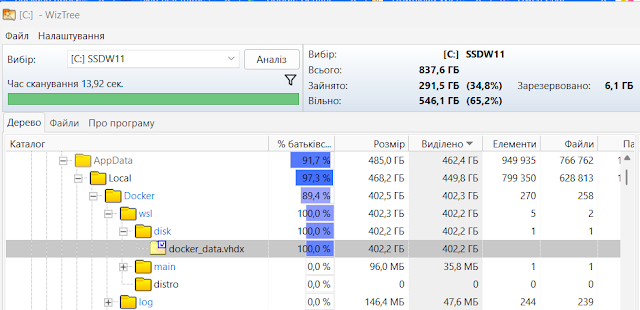
<p>Docker у Windows працює через WSL (Windows Subsystem for Linux), яка в свою чергу використовує віртуалізацію Hyper‑V. Це означає, що всі дані зберігаються у файлах образів віртуальних дисків .vhdx.</p>

<p>З часом диск починає стрімко розростатися, і рано чи пізно місце на системному SSD закінчується. Тоді виникає питання: куди ж воно поділося?</p>

<p>На допомогу приходить утиліта WinTree (diskanalyzer.com), яка дозволяє швидко побачити, що саме займає простір.</p>

<p>Саме так я й з’ясував, що проблема була у Docker. Але коли перевірив сам Docker - там усе вже очищено, а файл .vhdx продовжував залишатися гігантським.</p>

<div class="language-plaintext highlighter-rouge"><div class="highlight"><pre class="highlight"><code>docker system df

TYPE            TOTAL     ACTIVE    SIZE      RECLAIMABLE
Images          2         2         329.2MB   0B (0%)
Containers      3         0         2B        2B (100%)
Local Volumes   62        1         2.309GB   2.125GB (92%)
Build Cache     0         0         0B
</code></pre></div></div>

<h3 id="чому-vhdx-росте-безконтрольно">Чому VHDX росте безконтрольно.</h3>

<p>Реальний розмір віртуального тому завжди більший за фактичні дані. Це відбувається тому, що .vhdx‑файл у WSL та Docker може лише збільшуватися у міру потреби.</p>

<p>Коли ти видаляєш образи чи очищаєш дані, простір всередині Linux‑файлової системи звільняється, але сам файл на диску не стискається автоматично.</p>

<p>Тому він продовжує залишатися гігантським, навіть якщо даних там майже немає.</p>

<p><a href="https://blogger.googleusercontent.com/img/a/AVvXsEgQY0pR8CFeWh-sZ7f-gt-208bT_CA-cVO0tQnXWU1ObzxFl21KCRJRodFvNSJIDkXXYRp4n4pfviDNL6_WtgEWSGmss7VkioZcc8snZaI2mfzuPlDKDZrWyq33FLPCSOpKHQt932LpgrDXY0mHIPU7SZ00Mod7diWfdzm1pCiBXEUUm4EcuX2kL-VVw0aa"><img src="/assets/images/blog/8321bd847cb4b411-7b76a12625d5fbf4.jpg" alt="" /></a><br />
<em>Docker .vhdx before compact</em></p>

<h3 id="стискаємо-образ-диску">Стискаємо образ диску</h3>

<p>Виходимо з застосунку “Docker Desktop” та робимо завершення “WSL”:</p>

<div class="language-plaintext highlighter-rouge"><div class="highlight"><pre class="highlight"><code>wsl --shutdown
</code></pre></div></div>

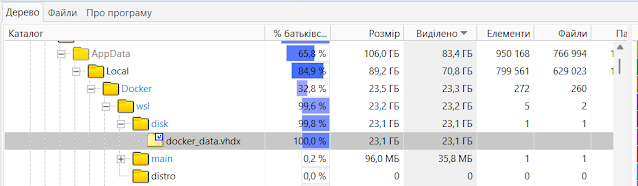
<p>Стискаємо VHD файл відкриваючи консоль PowerShell як Administrator.</p>

<div class="language-plaintext highlighter-rouge"><div class="highlight"><pre class="highlight"><code>Optimize-VHD -Path "$env:LOCALAPPDATA\Docker\wsl\disk\docker_data.vhdx" -Mode Full
</code></pre></div></div>

<p>Тепер набагато краще.</p>

<p><a href="https://blogger.googleusercontent.com/img/a/AVvXsEjxXEt5-Cj5CfHQFIYf6oO--a4qlMaIG6tpQFcIceZb0sZlvcqTfFiOTUDn3hfqKA6ogoPhelFeH_qqybRKMacDGEon61fY6lwso0PhT06uXkJwuZTsdATTFR5bdOASBnwbqMyOkr3VAkBN8PhTgTbzkpNJjHfcu-te_fYA1GAr0DnpBVdWF6H5PoWYQx0z"><img src="/assets/images/blog/8321bd847cb4b411-22e1d0ce42e0e5d9.jpg" alt="" /></a><br />
<em>Docker .vhdx after compact</em></p>]]></content><author><name></name></author><category term="docker" /><category term="Virtualization" /><category term="windows" /><summary type="html"><![CDATA[Куди зникає місце на диску?]]></summary></entry><entry><title type="html">pfSense + HAProxy + ACME: HTTP-01 validation without using port 80</title><link href="https://lexsysko.github.io/2025/12/24/pfsense-haproxy-acme-http-01-validation-without-using-port-80.html" rel="alternate" type="text/html" title="pfSense + HAProxy + ACME: HTTP-01 validation without using port 80" /><published>2025-12-24T11:09:00+00:00</published><updated>2025-12-24T11:09:00+00:00</updated><id>https://lexsysko.github.io/2025/12/24/pfsense-haproxy-acme-http-01-validation-without-using-port-80</id><content type="html" xml:base="https://lexsysko.github.io/2025/12/24/pfsense-haproxy-acme-http-01-validation-without-using-port-80.html"><![CDATA[<h4 id="вступ">Вступ</h4>

<p>У багатьох інсталяціях <a href="https://www.pfsense.org/">pfSense</a> використовується не лише як firewall, а і як
точка термінації HTTPS для внутрішніх вебсервісів. Типовий стек виглядає
так:</p>

<ul>
  <li>pfSense - firewall та reverse-proxy</li>
  <li><a href="https://www.haproxy.org/">HAProxy</a> - маршрутизація HTTP/HTTPS трафіку</li>
  <li><a href="https://letsencrypt.org/docs/client-options/">ACME (Let’s Encrypt)</a> - автоматична генерація HTTPS сертифікатів</li>
  <li>Внутрішні вебсервери - працюють по HTTP у локальній мережі</li>
</ul>

<p>У цій публікації як розгляну як коректно пройти ACME HTTP-01 валідацію, коли
порт 80 вже зайнятий HAProxy, без зупинки сервісів і без DNS-01.</p>

<p><a href="https://blogger.googleusercontent.com/img/b/R29vZ2xl/AVvXsEh4RgHhDrXg0zyKKmCdk_qT6lfl5G4BO1_cJ9_OlpEsrG-MBq6b91pq5Bopfwu5SzyonxUsgNL9LwyED6I5m7iFEvHDVL9TWu3A4vYbiWvbSzvc3klnQ5Kao0KH4Js-d2Tlh7UF6JDc07yNO4ep8RHuzjNzwi8MYmFdXgDAlfP4f7bDZhcuufa4m9pu9r_5/s737/intro.png"><img src="/assets/images/blog/32b1906c76d47c9f-46e249e1038aa826.png" alt="" /></a></p>

<h4 id="вихідні-умови">Вихідні умови</h4>

<h2 id="інфраструктура">Інфраструктура</h2>

<ul>
  <li>pfSense firewall</li>
  <li>У локальній мережі є декілька вебсерверів, яким потрібні HTTPS сертифікати</li>
  <li>Доступ до них забезпечує HAProxy, що працює безпосередньо у pfSense</li>
</ul>

<h3 id="haproxy">HAProxy</h3>

<p>Прослуховує:</p>

<ul>
  <li>80/tcp (HTTP)</li>
  <li>443/tcp (HTTPS)</li>
</ul>

<p>Функції:</p>

<ul>
  <li>HTTP → HTTPS redirect</li>
  <li>TLS termination</li>
  <li>Маршрутизація за доменним іменем (ACL по Host)</li>
  <li>Робота з HTTP backend (без TLS усередині LAN)</li>
</ul>

<h3 id="acme">ACME</h3>

<ul>
  <li>Сертифікати генеруються через: <em>Services → ACME → Certificates</em></li>
  <li>Використовується <strong>HTTP-01</strong> validation</li>
  <li>Стандартний порт 80 недоступний, бо його вже використовує HAProxy</li>
</ul>

<p><em>Проблема</em><strong>ACME HTTP-01 завжди звертається на порт 80:</strong></p>

<div class="language-plaintext highlighter-rouge"><div class="highlight"><pre class="highlight"><code>http://example.com/.well-known/acme-challenge/&lt;token&gt;
</code></pre></div></div>

<p>Але:</p>

<ul>
  <li>порт 80 вже зайнятий HAProxy</li>
  <li>зупиняти HAProxy під час renew — погана ідея</li>
  <li>перенаправлення на інший порт (81, 8080) не підтримується
<strong>Let’s Encrypt</strong></li>
</ul>

<h4 id="рішення-haproxy-як-проксі-для-acme-standalone">Рішення: HAProxy як проксі для ACME standalone</h4>

<p><a href="https://blogger.googleusercontent.com/img/b/R29vZ2xl/AVvXsEi0QrfM-FdXlB9lTMF8C42PNDZyZtWz9UA_j-yyGntFzXaHGrw8CjpzzFd4aIBQP-RLDZI8u4EqeezmgFrtnNWbkphWMV-iCUqPJanuqRZ9unpXrLfcXeFjWyyeIBE9Y5YIvphGuFdM6L-n4zJVkyz7Sgx7FDXji8rtvRI1v54AD8lhdvEz5ZLDxNTDb7J4/s2376/Services%20Acme%20Certificate%20options%20Edit.png"><img src="/assets/images/blog/759f6d129138fadf-7f77514a5c5b6691.png" alt="" /></a><br />
<em>Services Acme Certificate options</em></p>

<p>####</p>

<h3 id="ключова-ідея">Ключова ідея</h3>

<ul>
  <li>HAProxy залишається на порту 80</li>
  <li>
    <p>ACME під час валідації:</p>
  </li>
  <li>піднімає тимчасовий standalone webserver</li>
  <li>
    <p>на іншому локальному порту, наприклад 81</p>
  </li>
  <li>
    <p>HAProxy:</p>
  </li>
  <li>перехоплює лише запити до <em>/.well-known/acme-challenge/</em></li>
  <li>проксіює їх на <strong>127.0.0.1:81</strong></li>
</ul>

<p>Let’s Encrypt нічого не знає про порт 81 — для нього все відбувається через
порт 80</p>

<h3 id="acme-standalone-webserver">ACME standalone webserver</h3>

<p>Приклад команди, яку використовує pfSense ACME package під час валідації:</p>

<div class="language-plaintext highlighter-rouge"><div class="highlight"><pre class="highlight"><code>/usr/local/pkg/acme/acme.sh --issue \    
  --domain example.com \  
  --standalone --httpport 81 --listen-v4
</code></pre></div></div>

<p>Особливості:</p>

<ul>
  <li>вебсервер тимчасовий</li>
  <li>порт 81 відкритий лише на час валідації</li>
  <li>доступний тільки локально</li>
</ul>

<h3 id="налаштування-haproxy">Налаштування HAProxy</h3>

<p><a href="https://blogger.googleusercontent.com/img/b/R29vZ2xl/AVvXsEjUndhr6E4zatVvODJ15PY7SyG7N92caCcx-AZA6oELFIsuNxmdQ-PF3QJO3z6SQoM-a3UisZWcCDjcMUy5MaT_zB-CRQcyVSeCm0bKZFecPi8ByMNVeQwBT8i_chcOSNZAL4MFIT3nBSil_m9lCrld6S10DZn-iPGL7Ds-5yfjOTnomf579ujcsOEGBpBu/s2596/Services%20HAProxy%20Backend%20Edit.png"><img src="/assets/images/blog/48d14daca40a5aa6-03cb6682cf1c7088.png" alt="" /></a><br />
<em>Services HAProxy Backend Edit</em></p>

<p>####</p>

<h3 id="backend-для-acme">Backend для ACME</h3>

<p><a href="https://blogger.googleusercontent.com/img/b/R29vZ2xl/AVvXsEjeyBjhAx-oKYmYqNVK4YscvR9Cwde2XJ0jrbyLf4BfEdoxDmeEVCOWHXxaunuD5Hlfx19VUw9cUBFvUMYA5DeUqZ0bc-8sW2XfZZ-JNA4koDLkiq17FRv_28kcbvPvbkAJsknMvbvhmV9YIFFgG361jokaQ_acw8GIgHTMFEGRzdOCNJYvZ-oiduUNZ2C-/s4392/Services%20HAProxy%20Frontend%20Edit.png"><img src="/assets/images/blog/9dbc87865c5de20c-9e1da7dde2a5d51f.png" alt="" /></a><br />
<em>Services HAProxy Frontend Edit</em></p>

<p>Створюємо окремий backend, наприклад <strong>local_acme</strong>:</p>

<ul>
  <li>Address: 127.0.0.1</li>
  <li>Port: 81</li>
  <li>Mode: http</li>
  <li>Health checks - вимкнені</li>
</ul>

<p><em>Важливо: Standalone webserver не працює постійно. Якщо увімкнути health
check - backend завжди буде в статусі DOWN і HAProxy повертатиме
503.</em></p>

<h3 id="acl-правило">ACL правило</h3>

<p>У frontend для HTTP (port 80) додаємо ACL:</p>

<div class="language-plaintext highlighter-rouge"><div class="highlight"><pre class="highlight"><code>path_beg /.well-known/acme-challenge/
</code></pre></div></div>

<h3 id="routing-rule">Routing rule</h3>

<p>Перше правило у frontend:</p>

<div class="language-plaintext highlighter-rouge"><div class="highlight"><pre class="highlight"><code>if path_beg /.well-known/acme-challenge/ use_backend local_acme
</code></pre></div></div>

<p>Порядок правил критичний — ACME правило має бути перед redirect на
HTTPS. </p>

<h3 id="повний-потік-запиту">Повний потік запиту</h3>

<ol>
  <li>Let’s Encrypt → <em>http://example.com/.well-known/acme-challenge/…</em></li>
  <li>Запит приходить на pfSense, порт 80</li>
  <li>HAProxy:
    <ul>
      <li>бачить <em>path_beg /.well-known/acme-challenge/</em></li>
      <li>НЕ робить redirect</li>
      <li>проксіює на 127.0.0.1:81</li>
    </ul>
  </li>
  <li>ACME standalone webserver віддає challenge</li>
  <li>Сертифікат успішно згенеровано</li>
  <li>Standalone webserver завершує роботу</li>
</ol>

<h3 id="переваги-рішення">Переваги рішення</h3>

<ul>
  <li>без зупинки HAProxy</li>
  <li>без відкриття порту 81 у WAN</li>
  <li>без DNS-01</li>
  <li>повністю автоматичне renew</li>
  <li>production-ready схема</li>
</ul>

<h3 id="типові-помилки">Типові помилки</h3>

<ul>
  <li>redirect
HTTP → HTTPS для ACME path</li>
  <li>увімкнені health checks у backend</li>
  <li>path rewrite або security filtering</li>
  <li>неправильний порядок ACL правил</li>
</ul>

<h4 id="висновок">Висновок</h4>

<p>Ця схема
дозволяє коректно використовувати ACME HTTP-01 validation, навіть якщо порт 80
повністю зайнятий HAProxy.<br />
HAProxy виступає не як перешкода, а як тонкий маршрутизатор для ACME
challenge, що робить рішення стабільним і безпечним.</p>

<table>
  <thead>
    <tr>
      <th> </th>
    </tr>
  </thead>
  <tbody>
    <tr>
      <td> </td>
    </tr>
    <tr>
      <td> </td>
    </tr>
  </tbody>
</table>]]></content><author><name></name></author><category term="acme" /><category term="certbot" /><category term="certificate" /><category term="haproxy" /><category term="pfsence" /><summary type="html"><![CDATA[Вступ]]></summary></entry><entry><title type="html">Docker Port Is Busy on Windows? Fix for: bind: An attempt was made to access a socket in a way forbidden by its access permission.</title><link href="https://lexsysko.github.io/2025/06/21/docker-port-is-busy-on-windows-fix-for-bind-an-attempt-was-made-to-access-a-socket-in-a-way-forbidden-by-its-access-permission.html" rel="alternate" type="text/html" title="Docker Port Is Busy on Windows? Fix for: bind: An attempt was made to access a socket in a way forbidden by its access permission." /><published>2025-06-21T19:27:00+00:00</published><updated>2025-06-21T19:27:00+00:00</updated><id>https://lexsysko.github.io/2025/06/21/docker-port-is-busy-on-windows-fix-for-bind-an-attempt-was-made-to-access-a-socket-in-a-way-forbidden-by-its-access-permission</id><content type="html" xml:base="https://lexsysko.github.io/2025/06/21/docker-port-is-busy-on-windows-fix-for-bind-an-attempt-was-made-to-access-a-socket-in-a-way-forbidden-by-its-access-permission.html"><![CDATA[<h2 id="if-youre-getting-a-docker-error-like">If you’re getting a Docker error like:</h2>

<div class="language-plaintext highlighter-rouge"><div class="highlight"><pre class="highlight"><code>(HTTP code 500) server error - ports are not available: exposing port TCP 0.0.0.0:8182 -&gt; 127.0.0.1:0: listen tcp 0.0.0.0:8182: bind: An attempt was made to access a socket in a way forbidden by its access permissions.
</code></pre></div></div>

<p>But nothing is using the port, it’s likely because Windows has excluded the port dynamically, especially after Docker was previously using it.</p>

<p><a href="https://blogger.googleusercontent.com/img/b/R29vZ2xl/AVvXsEgOD9ulowu3N-_a57zqvG9Xd7_LzXl5bw7kWSsij9SDXCHDhbFXhrqLpgCTPJD4TisjGiIn3kr4ZnfmZuBXLbzPfx7YNXkxeuql9BbzqvnNTKQtLsX4brJtreSTXQbMdniHG9x00nJsqZB7J3dsIWOpyM8Q-RKz4wCSUOPU6PX_1wc-ZuVN3aHW_SW9EbWK/s2048/doker_busy_port.png"><img src="/assets/images/blog/4709027e7f19d38e-302ff603aa6750f2.png" alt="" /></a><br />
<em>(HTTP code 500) server error - ports are not available</em></p>

<h4 id="1-verify-nothing-is-listening-on-the-port">1. Verify Nothing Is Listening on the Port</h4>

<div class="language-plaintext highlighter-rouge"><div class="highlight"><pre class="highlight"><code>netstat -aon | findstr :8181
</code></pre></div></div>

<p>If you see no output, the port is not in use by any application.</p>

<h4 id="2check-excluded-port-ranges">2. Check Excluded Port Ranges:</h4>

<div class="language-plaintext highlighter-rouge"><div class="highlight"><pre class="highlight"><code>netsh interface ipv4 show excludedportrange protocol=tcp

Protocol tcp Port Exclusion Ranges

Start Port    End Port
----------    --------
      6575        6674
      7162        7261
      7262        7361
      7362        7461
      7462        7561
      7562        7661
      7681        7780
      7781        7880
      7881        7980
      7981        8080
      8081        8180
      8181        8280
      8281        8380
      8381        8480
      8481        8580
     30604       30703
     49690       49789
     49790       49889
     49890       49989
     50000       50059     *
     50160       50259
     50360       50459
     50460       50559
     50660       50759
     50760       50859
     50860       50959
     51064       51163
     51243       51342
     51344       51443
</code></pre></div></div>

<p>You’ll notice 8182 falls within the 8181–8280 range - without a * at the end, meaning it’s a dynamically excluded port.</p>

<p>You cannot remove dynamic exclusions manually.</p>

<h4 id="3-restart-winnat-service-to-clear-dynamic-exclusions">3. Restart winnat Service to Clear Dynamic Exclusions:</h4>

<p>This step clears dynamic port reservations created by services like Docker:</p>

<div class="language-plaintext highlighter-rouge"><div class="highlight"><pre class="highlight"><code>net stop winnat
net start winnat
</code></pre></div></div>

<p>* Run the above in Administrator Command Prompt</p>

<h4 id="4-recheck-excluded-ports">4. Recheck Excluded Ports:</h4>

<div class="language-plaintext highlighter-rouge"><div class="highlight"><pre class="highlight"><code>netsh int ipv4 show excludedportrange protocol=tcp

Protocol tcp Port Exclusion Ranges

Start Port    End Port
----------    --------
     50000       50059     *

* - Administered port exclusions.
</code></pre></div></div>

<p>If 8182 is no longer in the list, you’re good to go.</p>]]></content><author><name></name></author><category term="administration" /><category term="docker" /><category term="network" /><category term="permission" /><category term="ports" /><category term="security" /><category term="socket" /><category term="windows" /><summary type="html"><![CDATA[If you’re getting a Docker error like:]]></summary></entry><entry><title type="html">🚀 Docker-Compose Generator for ElasticSearch Cluster</title><link href="https://lexsysko.github.io/2025/03/23/docker-compose-generator-for-elasticsearch-cluster.html" rel="alternate" type="text/html" title="🚀 Docker-Compose Generator for ElasticSearch Cluster" /><published>2025-03-23T03:22:00+00:00</published><updated>2025-03-23T03:22:00+00:00</updated><id>https://lexsysko.github.io/2025/03/23/docker-compose-generator-for-elasticsearch-cluster</id><content type="html" xml:base="https://lexsysko.github.io/2025/03/23/docker-compose-generator-for-elasticsearch-cluster.html"><![CDATA[<p>Are you tired of manually configuring docker-compose.yml files for <a href="https://www.elastic.co/elasticsearch">Elasticsearch</a> clusters? Say hello to this easy-to-use Python script that automates the process! 🐍</p>

<p><a href="https://blogger.googleusercontent.com/img/b/R29vZ2xl/AVvXsEiqcFxvbVzT93a3MAwnfg3OZf0bL4fkDe4I3Ys2ibU6RPrXuiO0OiSmDefBZXFOazk6Bkn8KMBDq6sIog1H_IIdZ7cAipiJeLRX-XbUKeMibiIh64U7L_WHFFyyQcWUJBfe5mvml2zxgQSYIBy1dV1eMDax434F1RWg3zqhJHS16mlt9fgfqP-AXswm9G6g/s2048/ES_CL.JPG"><img src="/assets/images/blog/d5be6190ec524625-363bceaaea636184.jpg" alt="" /></a></p>

<p>📌 What it does:</p>

<p>This script generates a docker-compose.yml file for setting up an ElasticSearch cluster using template files and environment variables. It creates a cluster with Docker containers, including:</p>

<ul>
  <li>ElasticSearch nodes with different roles (master, data, ingest, coordinator)</li>
  <li><a href="https://www.elastic.co/kibana">Kibana</a> for visualization</li>
  <li>Additional service containers</li>
</ul>

<p>🔧 How it works:</p>

<ul>
  <li>Configure your cluster setup using a .env file.</li>
  <li>Run the script, and voilà! Your docker-compose.yml is ready.</li>
</ul>

<p>📶 Test Environment:</p>

<p>The generated cluster was tested on a <a href="https://www.truenas.com/">TrueNAS</a> SCALE 24.10.2 server, deployed as a custom application by importing the YAML file. Storage was configured using ZFS Datasets, ensuring reliability and scalability.</p>

<p>💡 Why it’s awesome:</p>

<ul>
  <li>Saves time and reduces errors in manual configuration.</li>
  <li>Flexible and customizable for different cluster setups.</li>
  <li>Perfect for DevOps engineers and developers working with ElasticSearch.</li>
</ul>

<p>🔗 Script: <a href="https://github.com/lexxai/es_cluster_docker_helper">https://github.com/lexxai/es_cluster_docker_helper</a>🔗 Prototype: <a href="https://github.com/evermight/elastic-cluster-docker-compose">https://github.com/evermight/elastic-cluster-docker-compose</a></p>]]></content><author><name></name></author><category term="Automation" /><category term="DevOps" /><category term="docker" /><category term="elasticsearch" /><category term="python" /><category term="TechInnovation" /><category term="TrueNAS" /><category term="ZFS" /><summary type="html"><![CDATA[Are you tired of manually configuring docker-compose.yml files for Elasticsearch clusters? Say hello to this easy-to-use Python script that automates the process! 🐍]]></summary></entry><entry><title type="html">Google Learning path: “Machine Learning Engineer Learning Path” - Completed</title><link href="https://lexsysko.github.io/2025/03/17/google-learning-path-machine-learning-engineer-learning-path-completed.html" rel="alternate" type="text/html" title="Google Learning path: “Machine Learning Engineer Learning Path” - Completed" /><published>2025-03-17T01:05:00+00:00</published><updated>2025-03-17T01:05:00+00:00</updated><id>https://lexsysko.github.io/2025/03/17/google-learning-path-machine-learning-engineer-learning-path---completed</id><content type="html" xml:base="https://lexsysko.github.io/2025/03/17/google-learning-path-machine-learning-engineer-learning-path-completed.html"><![CDATA[<p>Нарешті в останній день дії кредитів на навчання отримав сертифікат “<a href="https://www.cloudskillsboost.google/public_profiles/07c1b2c1-14be-47da-acbb-f57701d14790/badges/14326831?locale=uk">Responsible AI for Developers: Privacy &amp; Safety</a>” від Google, чим і завершив довгий, з вересня 2023, Google Learning path: “<a href="https://www.cloudskillsboost.google/paths/17">Machine Learning Engineer Learning Path</a>”.</p>

<p><a href="https://blogger.googleusercontent.com/img/b/R29vZ2xl/AVvXsEjg6OA0cpTax2lPLeId-Co9I3vmU4dsevquhoqgsuS8vafn7LJyxq6NnPm4cA4TMECMiQm6AdfVBG_pUfx0p7x3-8zou8iClxLQ-SX7CS66iZ-zR7W1COE2iy1jZvpIQyCMz6bSweDjPiOWVgTsIeGjyO7ppAXNmrK3MEnoCwjPrypVvCeud0nq0yEGszQn/s1058/%D0%97%D0%BD%D1%96%D0%BC%D0%BE%D0%BA%20%D0%B5%D0%BA%D1%80%D0%B0%D0%BD%D0%B0%202025-03-17%20%D0%BE%2002.30.27.png"><img src="/assets/images/blog/ad3b0cdce4ae15eb-84b241a72714a6c1.png" alt="" /></a><br />
<em>Responsible AI for Developers: Privacy &amp; Safety</em></p>

<p><a href="https://blogger.googleusercontent.com/img/b/R29vZ2xl/AVvXsEita9Jj0kSveGpQuG3huJxRMnwewV6FedbkDMKaHFwXCQmDGYlysb2f7cJ7Kp_O6GQ9D6VjnKGxT7P2RGIN5ZHjgZU4k2FxhU82dJI1NVITn2BLEk5VfZcSsAOhQSOU88wx2hYF2Bhc2zg6TBFZMjn3CREQIZifKvV0gHf-S64RDey5IaN_W2N1Fap7vyg-/s2750/%D0%97%D0%BD%D1%96%D0%BC%D0%BE%D0%BA%20%D0%B5%D0%BA%D1%80%D0%B0%D0%BD%D0%B0%202025-03-17%20%D0%BE%2002.21.18.png"><img src="/assets/images/blog/953723a72aad15ae-afdddb287ddf441f.png" alt="" /></a><br />
<em>Progress “Machine Learning Engineer Learning Path”</em></p>

<p><a href="https://blogger.googleusercontent.com/img/b/R29vZ2xl/AVvXsEgyKEEE65w5xSxuoFyuh7FC2oCEYCLyxFwNTtlF97LIfQPLDqdCVhdWx9WyBI1nQxBCPzr4w_u1eNxUaeZzB2uK61FUvH4R0EsSi4he0ycrJBfwDP_Vu5Fie2418flR-h9xstD-A2IEsJDuoR1qln0ZtG_acJR5y2pfx89aKb61Z60Yo2IChETgDvWHQxZJ/s11578/Screenshot%202025-03-17%20at%2002-23-57%20Machine%20Learning%20Engineer%20Learning%20Path%20Google%20Cloud%20Skills%20Boost.png"><img src="/assets/images/blog/ba0851c35c82590c-8c5ad25d5b8fc3ab.png" alt="" /></a><br />
<em>Machine Learning Engineer Learning Path</em></p>

<h1 id="machine-learning-engineer-learning-path">Machine Learning Engineer Learning Path</h1>

<h3 id="a-machine-learning-engineer-designs-builds-productionizes-optimizes-operates-and-maintains-ml-systems">A Machine Learning Engineer designs, builds, productionizes, optimizes, operates, and maintains ML systems.</h3>

<p>21 activities</p>

<p>##</p>

<p>A Machine Learning Engineer designs, builds, productionizes, optimizes, operates, and maintains ML systems. This learning path guides you through a curated collection of on-demand courses, labs, and skill badges that provide you with real-world, hands-on experience using Google Cloud technologies essential to the ML Engineer role. Once you complete the path, check out the Google Cloud Machine Learning Engineer certification to take the next steps in your professional journey.</p>

<p>#</p>]]></content><author><name></name></author><category term="google" /><category term="Google Cloud" /><category term="Machine Learning" /><category term="MachineLearning" /><category term="ML" /><summary type="html"><![CDATA[Нарешті в останній день дії кредитів на навчання отримав сертифікат “Responsible AI for Developers: Privacy &amp; Safety” від Google, чим і завершив довгий, з вересня 2023, Google Learning path: “Machine Learning Engineer Learning Path”.]]></summary></entry></feed>